Blog Archive

Showing posts with label ANDROID LAUNCHER. Show all posts

iLauncher 2.0.10.4 Apk


iLauncher 2.0.10.4 Apk | 993 KB | Mediafire / MirrorCreator
Requires Android:2.1 and up

AndroidApps.Tk

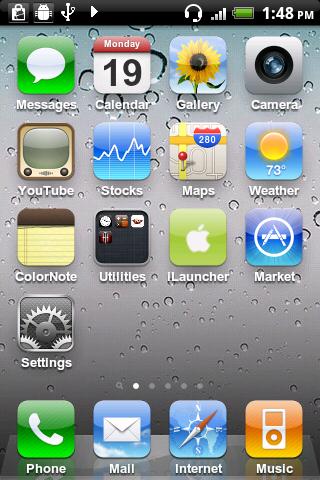
iPhone style home screen launcher. This is an iPhone style home screen launcher. The launcher makes your phone work just like a real iPhone.

v2.0.10.4 update:
- fixed bug

** This is NOT a fake screen nor an icon pack. **

- Smooth scrolling.
- Icons have rounded corners and gloss effects.
- Long touch icons to move them around and position them as you like.
- Supports a customizable dock-bar.
- Easily uninstall apps from your home screen.
- Press the back hardware key to exit edit mode.
- Spotlight search

This version aims to replicate the home screen functions provided by iOS 3. Features that are not supported in the current version will eventually be supported in later 1.x versions. Features available on iOS 4 and later are planned to be supported in version 2.0.

Tested with HTC Legends, Galaxy S, Nexus One, HTC Desire.

Download

Download - Market

Full Screen Launcher Pro 1.6.1 Apk


Full Screen Launcher Pro 1.6.1 Apk | 587 KB | Mediafire / MirrorCreator
Requires Android:2.2 and up

AndroidApps.Tk

The Full Screen Launcher is a replacement home screen for your android Device. This 3D launcher will give you unlimited space on your phone home screen and quick access to your contacts and applications.

v1.6.1 update:
- improved : bitmap memory usage
- improved : framerate
- fixed : icons not showing on first startup
- fixed : camera no longer move when pressing home key
- added : animation when dropping an item inside folder
- added : pl translation

--== Features ==--
- 3D wall : the desktop becomes a big wall with OpenGL ultra smooth scrooling
- Coll animation when switching walls
- Widget support : widget dropped on the desktop are converted to 3D and shown back in 2D when needed (tested with Facebook, Calendar, power and weather widgets...)
- Full Screen Caller ID integration : drop HD picture of your favorite contacts for easier access.
- Folder : Unclutter your home screen with folders. Each folder is displayed as a new wall and can contains widgets, application icons, contacts.
- Wallpaper support : when zooming inside your wall, the android wallpaper zoom
- Live Wallpaper support

--== How to use ==--
Press your home button to select the Full Screen Launcher as the default launcher.
The first use will render textures into cache, this might slows down the application.
To add widget, shortcuts or contacts to your home screen, simply long press the desktop.
All items can be picked with a long press.
To create folder, long press the desktop and choose add folder. You can now drop any items in your new folder. Folders are shown on the home screen as a 3D cube previewing the content of the folder.

Download

Download- @ Market

GO Launcher EX 2.70 Final Apk


GO Launcher EX 2.70 Final Apk | 4.3 MB | Mediafire / MirrorCreator
Requires Android:2.0 and up

AndroidApps.Tk

v2.70 update:
1. (New) Use the “icon size” option to change sizes of both homescreen and dock icons
2. (Improve) Homescreen indicator returns to top area when using large icon size
3. (Improve) If no enough room for adding GO widgets, enter preview screen to select other screens
4. (Improve) Delete and rewrite most of toast info
5. (Improve) Scroll effect of introduce screen indicator is improved (the first time install GO Launcher)

Features:
- Hundreds of themes
- Fancy home screen transition
- Smooth scrolling experience
- Icon popup menu
- Folder and task manager in app drawer
- Gesture supported
- Scrollable & resizable widgets supported

Fixed:
- Add shortcut of GO Launcher (Long press home screen-Shortcut- GO Launcher).
- Synchronize home folder and app draw folder.
- Directly drag to change app icon on dock bar.
- Directly open folder on dock bar.
- Add 3D transition for vertical continuous scrolling (MENU-Preferences-Effects Settings-Vertical scroll effect).
- Support single screen wallpaper (MENU-Preferences-Screen Settings-Normal/Portrait Wallpaper).

Download

iLauncher 2.0.10.3 Apk


iLauncher 2.0.10.3 Apk | 993 KB | Mediafire / MirrorCreator
Requires Android:2.1 and up

AndroidApps.Tk

iPhone style home screen launcher. This is an iPhone style home screen launcher. The launcher makes your phone work just like a real iPhone.

v2.0.10.3 update:
- fixed restarting problem
- now can change icon's title
- application list is now sorted by each app's name and provide fast scroller

** This is NOT a fake screen nor an icon pack. **

- Smooth scrolling.
- Icons have rounded corners and gloss effects.
- Long touch icons to move them around and position them as you like.
- Supports a customizable dock-bar.
- Easily uninstall apps from your home screen.
- Press the back hardware key to exit edit mode.
- Spotlight search

This version aims to replicate the home screen functions provided by iOS 3. Features that are not supported in the current version will eventually be supported in later 1.x versions. Features available on iOS 4 and later are planned to be supported in version 2.0.

Tested with HTC Legends, Galaxy S, Nexus One, HTC Desire.

Download

Download - Market